

The  Formulaic Assemblicator is Mekanism’s auto-crafter, a powered
  Crafting Table that’ll keep making one recipe for as long as it has the ingredients. To use it that way you’ll need to save the recipe onto a
  Crafting Formula and turn on Auto-Mode, and it then crafts one item every 2 seconds for 40 FE/t (100 J/t).
It works as a normal crafting bench as well, with 18 slots of its own storage underneath the grid. That means you’re able to use it by hand without a formula at all, which is handy for crafting a lot of one thing from a stocked inventory.
How to Make It
The Formulaic Assemblicator is crafted from 4  Steel Ingots in the corners, a
  Crafter at the top, 2
  Basic Control Circuits on the sides, a
  Steel Casing in the middle and a wooden
  Chest at the bottom. On 1.20.1 the recipe used a Crafting Table where the Crafter is now.




A Crafting Formula is made from a piece of  Paper and one Basic Control Circuit, placed anywhere in the grid. You’ll need one formula for each Assemblicator that’s going to run on its own, and they can be wiped and used again, so there’s no need to craft a new one when you change the recipe.
How It Works
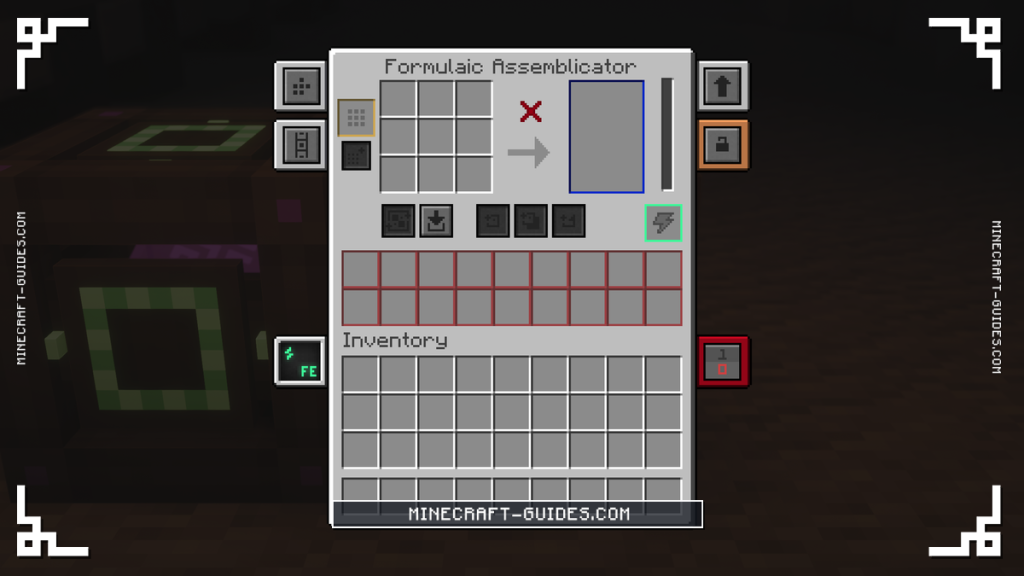
The screen has a 3 by 3 crafting grid, 18 input slots below it, 6 output slots to the right and a single slot for the formula. Without a formula, you lay out a recipe in the grid and use the buttons to craft, and the results go into the output slots.
| Button | What It Does |
|---|---|
| Fill Grid | Moves ingredients from the input slots into the grid |
| Empty Grid | Clears the grid back into the input slots |
| Craft Single Item | Crafts the recipe in the grid once |
| Craft Available Items | Crafts the recipe as many times as the ingredients allow |
| Encode Formula | Saves the recipe in the grid onto the Crafting Formula |
| Auto-Mode | Crafts the encoded recipe by itself, using power |
| Stock Control | Reserves input slots for each ingredient |
The first four buttons are all you need for crafting by hand, and they don’t use a formula. Encode Formula, Auto-Mode and Stock Control are the ones for automation, and Auto-Mode can’t be switched on until there’s an encoded formula in the slot.
Setting up a recipe
Place the ingredients in the grid the way you would in a Crafting Table, then put a blank Crafting Formula in the formula slot and press Encode Formula. Its name will change to show it’s encoded, and from then on the 18 input slots will only accept items that belong to that recipe.

Now turn on Auto-Mode and the Formulaic Assemblicator will pull ingredients from its input slots into the grid and craft them, one item every 2 seconds. It’ll carry on until an ingredient runs out or the output slots are full, then pick up again by itself when that’s sorted.
Auto-Mode will switch itself off if the formula is taken out of its slot, so it has to stay in there while the machine is running. If you want to use the same formula for a different recipe, hold it in your hand, then sneak and right-click to wipe it.
Stock Control
When ingredients are piped in, one of them might arrive faster than the others and fill all 18 input slots, which leaves no room for the rest and stops the recipe. Stock Control is there to prevent that, as it ties each input slot to one ingredient, so every part of the recipe always has space.
It’s worth turning on for any recipe with more than one ingredient that’s being fed by pipes. For a recipe made of a single item, like compressing ingots into blocks, it doesn’t change anything and can be left off.
Upgrades and Automation
The Formulaic Assemblicator takes  Speed Upgrades and
  Energy Upgrades, up to 8 of each. It holds 16,000 FE and only draws its 40 FE/t while a craft is in progress, so an idle one costs nothing to leave connected.
Items and energy both have side settings, which are found in the side configuration tab, and auto-eject is off until you switch it on. Once it’s on, the crafted items are pushed out of the output side into a Chest or a Logistical Transporter, and ingredients can be piped into an input side in the same way.
If you set its redstone control to Pulse, it’ll craft once for every redstone pulse instead of running all of the time. That’s one way to make an exact number of something, and a  QIO Redstone Adapter is able to do the same job, as it can switch the machine off once there’s enough in storage.
To feed it, you’ll want a  Logistical Sorter that pulls the right items out of a Chest, as the input slots will refuse anything that isn’t part of the recipe. The filters you’d use for that are on the sorter’s own page, which is the next step if you’re building a crafting line.
FAQ
Lay out a recipe in its grid, put a Crafting Formula in the formula slot and press Encode Formula. Then turn on Auto-Mode, give it power and fill the input slots with ingredients. It’ll craft that recipe every 2 seconds and put the results in the output slots.
You’ll need one piece of Paper and one Basic Control Circuit, which can be placed anywhere in the crafting grid. The formula is blank until a recipe has been encoded onto it inside the Formulaic Assemblicator, and it can be wiped again by sneaking and right-clicking while you’re holding it.
It stops when an ingredient is missing, when the 6 output slots are full, or when it’s out of power. If one ingredient has filled every input slot, turn on Stock Control so each one keeps its own slots. Auto-Mode also turns off if the formula is removed.
It works as a crafting bench without one, as you can place a recipe in the grid and use Craft Single Item or Craft Available Items. The formula is only needed for Auto-Mode, where it remembers the recipe so the machine can craft with nobody there.


